Turn Off Compatibility Mode for Steam
⚠️ This was originally posted on January 23, 2012. The information may be outdated!
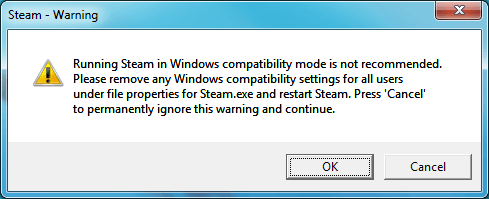
Sometimes when Steam crashes or there is a problem with it (or a game running from it) Windows 7 thinks that Steam needs to run in compatibility mode. This is a problem, because Steam doesn’t need to be in compatibility mode and shouldn’t be. Compatibility mode can cause issues with some games.
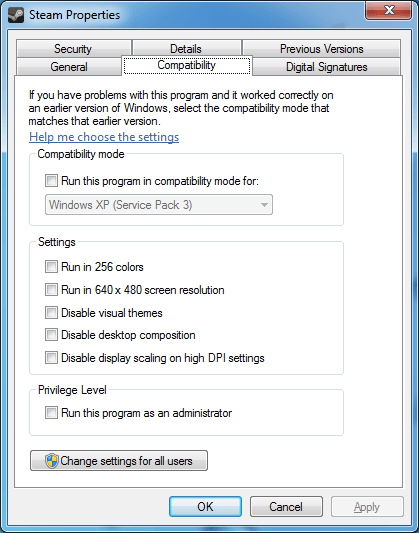
Unfortunately turning this off isn’t as simple as right-clicking on the shortcut (or even the steam.exe file), viewing the tab, and unchecking the Run this program in compatibility mode for option.
Fortunately I found this quick fix using a simple registry edit:
- Go to the Start menu and type “
regedit” into the search box and press . If you have UAC enabled you’ll need to click to continue. - Browse to HKEY_CURRENT_USER\Software\Microsoft\Windows NT\CurrentVersion\AppCompatFlags\Layers and delete the entry for the
steam.exefile.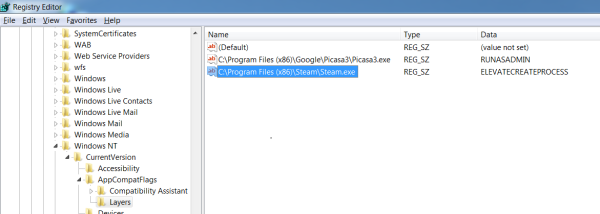
Browse to the steam.exe registry entry that enables compatibility mode. 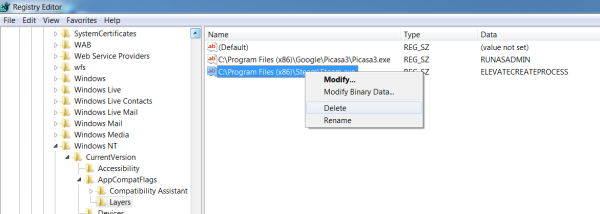
Right-click on the registry entry and delete it. 
Confirm that you want to delete the registry entry. - You should also see if there is an entry in HKEY_LOCAL_MACHINE in the same location and delete it as well. Failing that, check in HKEY_CURRENT_USER\Software\Microsoft\Windows NT\CurrentVersion\AppCompatFlags\Compatibility Assistant\Persisted.
- Restart your computer. Steam should no longer run in compatibility mode.
I think it’s unfortunate that Windows 7 automatically applies compatibility mode without your consent and without a user-friendly way of turning it off, but at least it’s relatively easy to fix. If you’ve encountered this problem and have another solution or more information let me know in comments!
Comments
Comments are closed